
Appearance
CSS
background-image
当background-image路径存在空格,背景图无法展示
解决方法:
js
url.replace(/\s/g, encodeURIComponent(' '))First letter drop
可以使用:first-letter选择器,给第一个文字(字母、汉字)单独设置样式。
css
p:first-letter {
  font-size: 200%;
  color: #8A2BE2;
}
span:first-letter {
  display: block;
  font-size: 200%;
  color: #3329b3;
}但是,该选择器只对块级元素有效(设置display: block;也没有效果)。

Image text wrapping
shape-outside属性,可以设置一个非矩形的区域,定义文本流。
html
<style>
.main {
  width: 500px;
}

.left,
.right {
  width: 40%;
  height: 12ex;
  background-color: lightgray;
}

.left {
  -webkit-shape-outside: polygon(0 0, 100% 100%, 0 100%);
  shape-outside: polygon(0 0, 100% 100%, 0 100%);
  float: left;
  -webkit-clip-path: polygon(0 0, 100% 100%, 0 100%);
  clip-path: polygon(0 0, 100% 100%, 0 100%);
}

.right {
  -webkit-shape-outside: polygon(100% 0, 100% 100%, 0 100%);
  shape-outside: polygon(100% 0, 100% 100%, 0 100%);
  float: right;
  -webkit-clip-path: polygon(100% 0, 100% 100%, 0 100%);
  clip-path: polygon(100% 0, 100% 100%, 0 100%);
}

p {
  text-align: center;
}
</style>

<div class="main">
  <div class="left"></div>
  <div class="right"></div>
  <p>
    Sometimes a web page's text content appears to be
    funneling your attention towards a spot on the page
    to drive you to follow a particular link. Sometimes
    you don't notice.
  </p>
</div>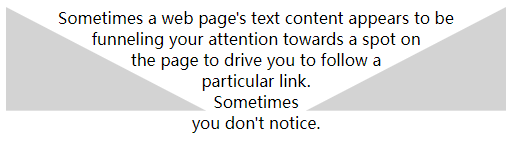
:where()
使用:where伪类简化CSS,:where伪类函数接收选择器列表作为参数,为参数中的元素设置样式。 例如:
css
.page div,
.page .title,
.page #article {
  color: red;
}
/* 使用where */
.page :where(div, .title, #article) {
  color: red;
}
Shadow for transparent images
我们都尝试过使用box-shadow给图片边框添加阴影,那你是否想过要给透明图片中的内容添加阴影呢,drop-shadow就可以实现,drop-shadow属性遵循图像的alpha通道,所以阴影基于图像内部的形状,而不是在外部显示。
css
.box-shadow {
  box-shadow: 2px 4px 8px #3723a1;
}

.drop-shadow {
  filter: drop-shadow(2px 4px 8px #3723a1);
}
Typing effect for text
使用@keyframes实现打字机效果
html
<style>
.typing-effect {
  width: 22ch;
  white-space: nowrap;
  overflow: hidden;
  border-right: 3px solid;
  font-family: monospace;
  font-size: 2em;
  animation: typing 2s steps(22), effect .5s step-end infinite alternate;
}

@keyframes typing {
  from {
    width: 0;
  }
}
@keyframes effect {
  50% {
    border-color: transparent;
  }
}
</style>

<div class="typing-effect">Typing effect for text</div>
Set a custom cursor
自定义光标
css
.image-cursor {
  cursor: url("https://cdn-images-1.medium.com/fit/c/80/80/1*AmBIV4haXTWPO--EhE0Q1A.jpeg"), auto;
}
.emoji-cursor {
  cursor: url("data:image/svg+xml;utf8,<svg xmlns='http://www.w3.org/2000/svg'  width='48' height='48' viewport='0 0 100 100' style='fill:black;font-size:24px;'><text y='50%'>🚀</text></svg>"), auto;
}
Checklist in pure CSS
使用CSS实现checklist,使用:checked伪类实现checklist
html
<style>
  .checklist {
    padding: 50px;
    position: relative;
    background: #043b3e;
    border-top: 50px solid #03a2f4;
  }
  .checklist h2 {
    color: #f3f3f3;
    font-size: 25px;
    padding: 10px 0;
    margin-left: 10px;
    display: inline-block;
    border-bottom: 4px solid #f3f3f3;
  }
  .checklist label {
    position: relative;
    display: block;
    margin: 40px 0;
    color: #fff;
    font-size: 24px;
    cursor: pointer;
  }
  .checklist input[type="checkbox"] {
    -webkit-appearance: none;
  }
  .checklist i {
    position: absolute;
    top: 2px;
    display: inline-block;
    width: 25px;
    height: 25px;
    border: 2px solid #fff;
  }
  .checklist input[type="checkbox"]:checked ~ i {
    top: 1px;
    height: 15px;
    width: 25px;
    border-top: none;
    border-right: none;
    transform: rotate(-45deg);
  }
  .checklist span {
    position: relative;
    left: 40px;
    transition: 0.5s;
  }
  .checklist span:before {
    content: '';
    position: absolute;
    top: 50%;
    left: 0;
    width: 100%;
    height: 1px;
    background: #fff;
    transform: translateY(-50%) scaleX(0);
    transform-origin: left;
    transition: transform 0.5s;
  }
  .checklist input[type="checkbox"]:checked ~ span:before {
    transform: translateY(-50%) scaleX(1);
    transform-origin: right;
    transition: transform 0.5s;
  }
  .checklist input[type="checkbox"]:checked ~ span {
    color: #154e6b;
  }
</style>
<div class="checklist">
  <h2>Item Checklist with CSS</h2>
  <label>
    <input type="checkbox">
    <i></i>
    <span>Item #1</span>
  </label>
  <label>
    <input type="checkbox">
    <i></i>
    <span>Item #2</span>
  </label>
  <label>
    <input type="checkbox">
    <i></i>
    <span>Item #3</span>
  </label>
</div>